Dinasti adalah garis keturunan raja-raja atau penguasa yang memerintah secara turun-temurun dan berasal dari satu keluarga atau kerabat yang sama. [1]
Berikut adalah beberapa aspek penting mengenai konsep dinasti:
Pengertian Umum
Berasal dari bahasa Yunani dynasteia yang berarti kekuasaan atau kekuatan. [2]
Merujuk pada keluarga bangsawan atau wangsa yang memegang kendali kepemimpinan dalam kurun waktu lama (contoh: Dinasti Ming atau Dinasti Habsburg). [1, 2]
Secara luas, istilah ini juga dipakai untuk kelompok atau keluarga berpengaruh di luar pemerintahan, seperti bisnis besar, seni, atau olahraga. [2]
Politik Dinasti (Dinasti Politik)
Adalah praktik ketika kekuasaan atau jabatan publik dijalankan secara berkelanjutan oleh anggota keluarga atau kerabat dekat pejabat sebelumnya. [3]
Sering ditemukan dalam pemilihan kepala daerah, anggota legislatif, hingga posisi strategis pemerintahan. [3]
Dampak negatif: Berpotensi memicu korupsi, kolusi, nepotisme (KKN), melemahkan regenerasi kepemimpinan, dan membatasi peluang figur kompeten lain. [3, 4]
Dampak positif/pandangan lain: Dianggap sah secara hukum dalam negara demokrasi selama kandidat dipilih langsung oleh rakyat melalui mekanisme pemilu dan memenuhi syarat konstitusional. [3, 5, 6]
Menentukan dinasti "paling tua" dan "paling terkenal" dapat dilihat dari catatan sejarah resmi dan pengaruhnya yang sangat besar di dunia. Berikut adalah jawabannya:
1. Dinasti Paling Tua (Tertua)
Dinasti Yamato (Kekaisaran Jepang) Dinasti Yamato adalah dinasti atau wangsa tertua di dunia yang masih memerintah secara terus-menerus hingga hari ini. Berdasarkan tradisi dan legenda, dinasti ini didirikan oleh Kaisar Jimmu pada tahun 660 SM. Meskipun bukti sejarah tertulis yang konkret baru tercatat sejak abad ke-4 atau ke-5 Masehi, silsilah keluarga kekaisaran Jepang yang saat ini dipimpin oleh Kaisar Naruhito tidak pernah terputus selama lebih dari 1.500 tahun. [1, 2, 3, 4, 5, 6]
Dinasti Pandya (India) Jika menghitung dinasti kuno yang sudah runtuh, Dinasti Pandya di India selatan tercatat sebagai salah satu yang terlama. Dinasti ini diperkirakan sudah ada sejak tahun 400 SM dan baru benar-benar berakhir sekitar tahun 1618 M (berkuasa total lebih dari 2.000 tahun, meskipun kekuasaannya sempat terputus-putus). [7]
2. Dinasti Paling Terkenal
Predikat "paling terkenal" biasanya diberikan kepada dinasti yang mengubah peta sejarah dunia, memiliki peninggalan megah, atau sering diangkat dalam budaya populer. Berikut adalah beberapa yang paling ikonik:
Qin adalah dinasti yang pertama kali menyatukan Cina dan membangun fondasi Tembok Besar Cina. Sementara Ming terkenal karena pembangunan Kota Terlarang (Forbidden City) serta kemajuan seni keramik porselennya.
Berkuasa selama lebih dari 600 tahun (1299–1922). Terkenal karena menaklukkan Konstantinopel pada tahun 1453 di bawah pimpinan Sultan Mehmed II (Al-Fatihah) dan menjadi kekaisaran Islam lintas benua terbesar pada masanya.
Dinasti paling berpengaruh dalam sejarah Eropa Barat. Lewat pernikahan politik dan penaklukan, mereka sempat menguasai Kekaisaran Romawi Suci, Austria, Spanyol, hingga wilayah Amerika bertahun-tahun.
Dinasti yang membawa Rusia menjadi kekaisaran besar dunia. Sangat terkenal di budaya populer karena akhir tragisnya saat Revolusi Rusia (1917) serta kisah legendaris Putri Anastasia.
Terkenal karena raja-rajanya yang eksentrik dan dramatis, seperti Raja Henry VIII (yang memiliki 6 istri) dan Ratu Elizabeth I (Zaman Keemasan Inggris).
Dinasti Ptolemeus
Mesir Kuno
Merupakan dinasti keturunan Yunani-Makedonia yang memimpin Mesir pasca-kematian Alexander Agung. Tokoh paling terkenalnya adalah Ratu Cleopatra.
Apakah Anda ingin tahu lebih dalam tentang sejarah salah satu dinasti di atas, atau tertarik dengan dinasti kerajaan Nusantara seperti Majapahit dan Mataram?
Minyak but-but adalah minyak gosok herbal tradisional yang digunakan untuk pijat, mengurut, dan mengobati luka ringan seperti luka bakar, goresan, atau gigitan serangga. Minyak ini dibuat dari campuran berbagai minyak atsiri alami dan herbal seperti cengkeh, kencur, brotowali, dan minyak kayu putih yang memberikan efek hangat, membantu melancarkan peredaran darah, serta meredakan nyeri dan peradangan. Cara penggunaannya adalah dengan mengoleskan secukupnya pada bagian tubuh yang sakit.
Kandungan utama
Cengkeh: Mengandung eugenol yang bersifat antiinflamasi dan pereda nyeri.
Kencur: Memiliki sifat antiinflamasi untuk meredakan peradangan.
Brotowali: Mengandung flavonoid dan alkaloid yang bersifat analgesik (pereda nyeri).
Minyak Kayu Putih (Gelam): Memberikan efek hangat dan membantu melancarkan peredaran darah.
Manfaat dan kegunaan
Pijat dan urut: Digunakan untuk meredakan pegal linu, nyeri sendi, dan kesleo.
Luka ringan: Membantu mengobati luka bakar, goresan, dan luka akibat gigitan serangga dengan cara dioleskan atau ditempel kapas yang sudah dibasahi minyak.
Masalah kulit: Dapat membantu mengatasi iritasi, eksim, panu, atau bisul.
Sakit kepala: Dioleskan pada pelipis atau dahi untuk meredakan sakit kepala.
Diare: Dikonsumsi setengah sendok dicampur air hangat untuk meredakan diare atau keracunan makanan ringan.
Perut kembung: Dioleskan pada perut anak (terutama pada daun sirih) untuk mengatasi perut kembung.
Cara penggunaan
Oleskan secukupnya pada bagian tubuh yang sakit.
Untuk pijat, pijat secara perlahan untuk membantu penyerapan.
Untuk luka ringan, tempelkan kapas yang sudah dibasahi minyak.
Pastikan kulit dalam keadaan bersih dan kering sebelum dioleskan.
Hindari mengoleskan pada luka terbuka yang dalam atau area yang sensitif untuk mencegah iritasi.
Jika digunakan untuk luka bakar, oleskan perlahan dan sering dioleskan kembali agar tidak melepuh.
Untuk nyeri otot ringan, dapat membantu meredakan nyeri tanpa perlu minum obat. Namun, jika nyeri tidak membaik setelah beberapa hari, konsultasikan dengan dokter.
Evision Suplemen mata Detail Produk Evision adalah suplemen herbal 100% alami yang dapat meningkatkan kinerja penglihatan, otak dan syaraf terkecil. Evision mengandung vitamin dan antioksidan diformulasikan dengan teknologi modern dan sudah mendapat izin edar dari BPOM.
Sehingga sudah tidak diragukan lagi khasiat dan keamanannya. No. BPOM : TR 223004541 BAHAN/KOMPOSISI EVISION Herbal Ekstrak EVISION Dapat Mengobati Gejalah Mata Sbb
Mata Rabun Penglihatan Tidak Jelas
Mata Minus Plus penglihatan jarak dekat dan Jauh
Katarak Katarak menyebabkan lensa mata menjadi berawan,
Miovi
Glaukoma Glaukoma terjadi karena tingginya tekanan bola mata sehingga merusak saraf optik yang berperan dalam penglihatan.
refraksi Kerusakan Retina Mata Konjungtivitis (mata merah) Pterigium selaput lendir Strabismus mata Anda tidak sejajar Bisa Mengobati Semua Gejala Mata
Semua Bisa Diobati Dgn Mengkonsumsi Evision Rutin 2x Sehari 2 Kapsul Cara Kerja Evision
Pada penggunaan awal mata terasa lebih segar. Ini terjadi karena aliran darah semakin lancar ke mata Kandungan Centela Asiatica bekerja meregangkan pembuluh darah dan Ginkgo Biloba bekerja membuat partikel Menjadi Lebih Lancar Ke Mata
partikel darah lebih mengecil , sehingga suplai darah bisa menjangkau ke pembuluh-pembuluh darah terhalus Kealiaran Mata.
Setelah penggunaan 2 minggu, peredaran darah yang lancar telah membuat suplai oksigen yang dibawa oleh tubuh ke pembuluh-pembuluh terkecil Menjadikan mata sehat dan segar
Kenapa Pilih EVISION
Aman herbaal
Suda Ada Bpom
Tidak Ada Efek Samping Dan Bahan Kimia
Tidak Ketergantungan Obat
Cara kosumsi Sehari 2 x 2 Kapsul Setelah Makan Pagi Malam
Delapan Manfaat Daun Binahong untuk Kesehatan Sumber : Alodokter dr. Sienny Agustin Manfaat daun binahong bagi kesehatan sudah dikenal sejak ribuan tahun silam. Tak hanya bermanfaat untuk mempercepat penyembuhan luka, daun binahong juga dapat menurunkan kadar gula darah. Berbagai manfaat tersebut diperoleh berkat kandungan antioksidan yang tinggi dalam daun binahong.
Daun binahong (Anredera cordifolia) adalah tanaman merambat dengan ciri khas daun berbentuk seperti hati dan berwarna hijau tua. Tanaman ini banyak tumbuh di Indonesia dan beberapa wilayah tropis lainnya.
Binahong merupakan salah satu tanaman yang memiliki beragam khasiat, termasuk mengobati berbagai penyakit kronis. Bahkan, hampir seluruh bagian tumbuhan ini bisa dimanfaatkan sebagai pengobatan alternatif. Manfaat binahong bisa didapatkan dengan cara mengonsumsi maupun mengoleskannya ke kulit.Berbagai Manfaat Daun Binahong
Daun binahong, atau dikenal juga dengan daun madeira vine, mengandung sejumlah senyawa aktif yang merupakan antioksidan serta bersifat antiperadangan, antibakteri, dan antinyeri. Beragam kandungan tersebut berguna untuk menjaga kesehatan tubuh.
Beberapa senyawa alami di dalam daun binahong yang bermanfaat bagi kesehatan adalah flavonoid, saponin, dan tanin. Berkat berbagai kandungan dan khasiat tersebut, manfaat daun binahong yang bisa didapatkan adalah sebagai berikut:
1. Mempercepat penyembuhan luka bakar Daun binahong bisa digunakan untuk mempercepat penyembuhan luka, seperti luka bekas operasi hingga luka bakar. Manfaat binahong ini diduga berasal dari kandungan flavonoid, saponin, dan tanin di dalamnya.
Saponin dapat berperan sebagai antiseptik sehingga dapat mencegah infeksi bakteri yang dapat menghambat penyembuhan luka. Selain itu, senyawa ini juga dapat mempercepat pembentukan kolagen.
Flavonoid, yang juga dapat ditemukan dalam daun binahong, dapat mengurangi peradangan pada luka. Sementara itu, tanin dapat menghentikan perdarahan ringan sehingga luka menjadi lebih cepat tertutup.
2. Mengatasi Diare
Sifat antibakteri yang didapat dari senyawa alami dalam daun binahong juga bermanfaat untuk mengambat pertumbuhan bakteri Escherichia coli penyebab diare. Dengan begitu, daun binahong bisa Anda jadikan obat alami untuk mengatasi diare akibat infeksi bakteri Escherichia coli. Anda bisa memperoleh manfaat ini dengan mengonsumsi ekstrak daun binahong.
3. Mengatasi Jerawat
Binahong adalah salah satu tanaman herbal yang telah lama digunakan untuk mengatasi berbagai masalah kulit wajah, salah satunya jerawat. Manfaat daun binahong ini diperoleh dari senyawa saponin di dalamnya. Senyawa tersebut memiliki sifat antibakteri sehingga mampu menghambat pertumbuhan bakteri penyebab jerawat.
Salah satu penyebab terjadinya katarak adalah radikal bebas yang mengakibatkan kerusakan oksidatif pada lensa mata. Berbagai senyawa aktif yang terkandung dalam binahong, seperti flavonoid, tanin, dan polifenol, memiliki sifat antioksidan yang tinggi. Senyawa-senyawa tersebut mampu melindungi mata dari risiko terjadinya katarak akibat radikal bebas.
5. Mengatasi diabetes
Penelitian menunjukkan manfaat daun binahong dalam menurunkan kadar gula darah serta mencegah kerusakan sel beta di pankreas yang terjadi akibat diabetes.
Semua manfaat daun binahong tersebut didapatkan berkat senyawa aktif flavonoid yang bekerja dengan cara menghambat pemecahan dan penyerapan gula di usus, serta meningkatkan produksi dan fungsi hormon insulin.
Kolestrol tinggi merupakan salah satu faktor risiko terjadinya serangan jantung. Penderita kolestrol tinggi lebih berisiko mengalami pengendapan lemak dalam pembuluh darahnya. Endapan lemak ini bisa menghambat peredaran darah serta membentuk gumpalan, yang menyebabkan serangan jantung atau stroke.
Daun binahong telah digunakan sebagai obat herbal dalam pengobatan penyakit jantung dan stroke. Menurut penelitian, flavonoid dalam binahong bermanfaat dalam menurunkan kolestrol, yang bekerja dengan cara menyingkirkan timbunan kolestrol pada dinding pembuluh darah.
Tingginya level serum kreatinin dan urea dalam tubuh bisa menandakan melemahnya fungsi ginjal. Ekstrak daun binahong berkhasiat dalam meningkatkan fungsi ginjal dengan cara menurunkan level serum kreatinin
Sayangnya, penelitian mengenai manfaat daun binahong ini baru dilakukan terhadap hewan percobaan. Penelitian lebih lanjut kepada manusia masih perlu dilakukan untuk memastikan efektivitas dan keamanan daun binahong dalam meningkatkan fungsi ginjal.
8. Mengobati asam urat
Manfaat daun binahong sebagai obat asam urat telah didukung oleh banyak penelitian. Khasiat ini diduga berasal dari kandungan flavonoid. Flavonoid dapat menghambat pembentukan asam urat sehingga dapat mencegah dan mengurangi risiko terjadinya serangan asam urat.
Meski diyakini dapat mencegah atau mengobati berbagai penyakit, sebagian besar manfaat daun binahong tersebut masih memerlukan penelitian lebih lanjut. Jadi, selalu konsultasikan dengan dokter sebelum menggunakan daun binahong untuk mengatasi kondisi medis yang diderita.
Cara Mengolah Daun Binahong
Untuk memperoleh beberapa manfaat daun binahong di atas, Anda bisa mengolah daun binahong menjadi teh herbal dengan cara merebusnya. Berikut ini adalah langkah pembuatannya:Cuci bersih daun binahong dengan air mengalir.
Masukkan 5–6 lembar daun binahong ke dalam air panas.
Rebus selama 10 menit atau sampai mendidih.
Setelah matang, saring air rebusan tersebut dan dinginkan.
Setelah cukup dingin, Anda dapat minum air rebusan daun binahong tersebut. Tidak hanya diolah sebagai teh herbal, daun binahong juga bisa digunakan sebagai masker alami untuk mengatasi jerawat. Cara membuatnya pun cukup mudah.
Beberapa helai daun binahong dengan cara ditumbuk, kemudian campurkan sedikit air hingga menjadi pasta. Oleskan masker daun binahong ke bagian kulit wajah yang berjerawat dan diamkan selama 10 menit, lalu bilas dengan air hingga bersih. Cara mengolah daun binahong ini juga bisa dilakukan untuk mendapatkan manfaat binahong dalam mengatasi luka.
Meski secara umum dianggap sebagai bahan alami, bukan berarti obat herbal seperti daun binahong sepenuhnya aman. Hal ini karena sebagian orang mungkin saja mengalami reaksi yang berbeda.
Bila muncul reaksi alergi setelah menggunakan daun binahong, segera hentikan pemakaian. Bilas kulit dengan air bersih jika reaksi alergi muncul setelah mengoleskan binahong.
Pastikan juga Anda selalu berkonsultasi terlebih dahulu dengan dokter sebelum memetik manfaat daun binahong untuk mengatasi gangguan kesehatan. Hal ini penting untuk mendapatkan manfaat yang maksimal dari daun binahong tanpa memperparah keluhan yang Anda rasakan.Terakhir diperbarui: 22 November 2023
Ditinjau oleh: dr. Sienny Agustin
Tapping EFT (Emotional Freedom Technique) atau sering disebut “EFT Tapping”, adalah teknik sederhana namun dalam, digunakan untuk meredakan emosi negatif, stres, rasa sakit, bahkan trauma dengan mengetuk lembut titik-titik energi pada tubuh (titik akupresur).
Teknik ini menggabungkan dua hal:
Psikologi modern (pengakuan emosi, afirmasi positif)
Prinsip energi tubuh seperti dalam akupunktur tradisional Tiongkok.
Kita mengetuk dengan ujung jari di titik-titik tertentu
biasanya di wajah, dada, dan tangan <br>
sambil mengucapkan kalimat penerimaan dan pengampunan diri.
Titik-titik Tapping EFT Umum
Atas kepala (Top of Head)
Alis bagian dalam (Eyebrow)
Samping mata (Side of Eye)
Bawah mata (Under Eye)
Bawah hidung (Under Nose)
Dagu (Chin)
Tulang dada / bagian tengah dada (Collarbone)
Bawah ketiak (Under Arm)
Ujung jari (Karate Chop Point)
Langkah-langkah Dasar EFT
Identifikasi masalah
Misalnya: “Aku merasa cemas dan tidak tenang.”
Ukur intensitas emosi (0–10)
Sebelum mulai, nilai seberapa kuat perasaan itu.Buat kalimat afirmasi penerimaan,
Contoh:“Meskipun aku merasa cemas, aku tetap menerima dan mencintai diriku sepenuhnya.”
Mulai tapping:
Ketuk setiap titik sekitar 5–7 kaliUcapkan kalimat yang berhubungan dengan perasaanmu.
Rasakan perubahan energi yang lebih ringan.
Ukur lagi setelah selesai
Lihat apakah intensitas emosinya menurun.
Makna Spiritualnya
EFT seperti mengetuk pintu hati sendiri — mengingatkan diri bahwa kita tidak melawan rasa sakit, tapi menerima dan melepaskannya. Setiap ketukan membawa pesan kecil:
“Aku aman. Aku cukup. Aku diizinkan untuk sembuh.”
Ada saat-saat ketika dunia terasa terlalu bising, namun satu lagu legendaris
bisa membuat hati menjadi tenang. Musik seperti itu tidak hanya terdengar oleh
telinga—ia masuk ke dalam jiwa, membawa kita kembali pada masa-masa yang pernah
kita lewati. Setiap nada memiliki cerita, setiap lirik menyimpan kenangan.
Teks Latin
Rabbighfir lii
wa li-waalidayya warhamhumaa kamaa rabbayaanii shaghiiraa.
Terjemahan
"Ya Tuhanku, ampunilah dosaku dan dosa kedua orang tuaku, dan sayangilah keduanya sebagaimana mereka berdua telah mendidik aku di waktu kecil."
Teks Latin: Allahumma inna nas’aluka salamatan fiddin,
wa ‘afiyatan fil jasad,
wa ziyadatan fil ‘ilmi,
wa barakatan firrizqi, wa taubatan qablal maut, wa rahmatan ‘indal maut,
wa maghfiratan ba’dal maut.
Allahumma hawwin ‘alaina fii sakaratil maut,
wannajata minannari, wal ‘afwa ‘indal hisab.
Terjemahan
"Ya Allah, sesungguhnya kami memohon kepada-Mu keselamatan dalam agama,
kesehatan jasmani,
bertambahnya ilmu
keberkahan rezeki,
taubat sebelum mati, rahmat saat mati,
dan ampunan setelah mati.
Ya Allah, mudahkanlah kami dalam menghadapi sakaratul maut,
(berilah) keselamatan dari api neraka,
dan ampunan pada saat hisab (perhitungan amal)."
Latin Allāhumma bārik lanā fī aulādinā wa żurriyyātinā,
waḥfaẓhum wa lā taḍurrahum, warzuqnā birrahum.
Artinya: "Ya Allah, berilah keberkahan untuk kami pada anak-anak dan keturunan kami, jagalah mereka, jangan bahayakan mereka, dan berilah kami rezeki berupa ketaatan/bakti mereka (kepada kami)."


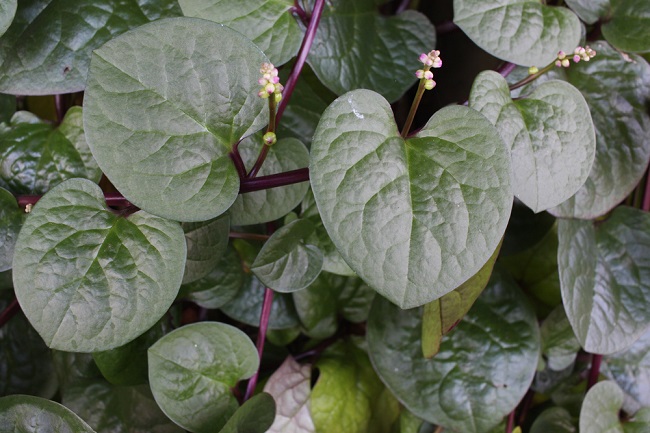 Binahong merupakan salah satu tanaman yang memiliki beragam khasiat, termasuk mengobati berbagai penyakit kronis. Bahkan, hampir seluruh bagian tumbuhan ini bisa dimanfaatkan sebagai pengobatan alternatif. Manfaat binahong bisa didapatkan dengan cara mengonsumsi maupun mengoleskannya ke kulit.Berbagai Manfaat Daun Binahong


.jpg)




 𝑴𝒖𝒉𝒂𝒔𝒂𝒃𝒂𝒉 𝑫𝒊𝒓𝒊 ✨
"𝑨𝒌𝒖 𝒕𝒊𝒅𝒂𝒌 𝒑𝒖𝒏𝒚𝒂 𝒉𝒂𝒓𝒕𝒂 𝒖𝒏𝒕𝒖𝒌 𝒅𝒊𝒑𝒂𝒎𝒆𝒓𝒌𝒂𝒏,𝑨𝒌𝒖 𝒕𝒊𝒅𝒂𝒌 𝒑𝒖𝒏𝒚𝒂 𝒊𝒍𝒎𝒖 𝒖𝒏𝒕𝒖𝒌 𝒅𝒊𝒃𝒂𝒏𝒈𝒈𝒂𝒌𝒂𝒏.𝑨𝒌𝒖 𝒉𝒂𝒏𝒚𝒂 𝒑𝒖𝒏𝒚𝒂 𝒅𝒐𝒔𝒂 𝒚𝒂𝒏𝒈 𝒉𝒂𝒓𝒖𝒔𝒅𝒊𝒑𝒆𝒓𝒕𝒂𝒏𝒈𝒈𝒖𝒏𝒈𝒋𝒂𝒘𝒂𝒃𝒌𝒂𝒏.𝑾𝒂𝒉𝒂𝒊 𝒅𝒊𝒓𝒊, 𝒃𝒆𝒍𝒂𝒋𝒂𝒓𝒍𝒂𝒉 𝒔𝒆𝒅𝒆𝒓𝒉𝒂𝒏𝒂𝒅𝒂𝒏 𝒋𝒂𝒏𝒈𝒂𝒏 𝒃𝒆𝒓𝒃𝒂𝒏𝒈𝒈𝒂 𝒅𝒊𝒓𝒊.𝑲𝒂𝒓𝒆𝒏𝒂 𝒌𝒆𝒏𝒚𝒂𝒕𝒂𝒂𝒏𝒏𝒚𝒂 𝒌𝒂𝒎𝒖 𝒕𝒊𝒅𝒂𝒌 𝒑𝒖𝒏𝒚𝒂𝒂𝒑𝒂-𝒂𝒑𝒂 𝒅𝒊 𝒅𝒖𝒏𝒊𝒂 𝒊𝒏𝒊, 𝒌𝒆𝒄𝒖𝒂𝒍𝒊 𝒏𝒚𝒂𝒘𝒂,𝒊𝒕𝒖 𝒑𝒖𝒏 𝒉𝒂𝒏𝒚𝒂 𝒕𝒊𝒕𝒊𝒑𝒂𝒏 𝒚𝒂𝒏𝒈 𝒔𝒆𝒘𝒂𝒌𝒕𝒖-𝒘𝒂𝒌𝒕𝒖𝒂𝒌𝒂𝒏 𝒅𝒊𝒂𝒎𝒃𝒊𝒍 𝒐𝒍𝒆𝒉 𝒀𝒂𝒏𝒈 𝑷𝒖𝒏𝒚𝒂." 🍂
𝑴𝒖𝒉𝒂𝒔𝒂𝒃𝒂𝒉 𝑫𝒊𝒓𝒊 ✨
"𝑨𝒌𝒖 𝒕𝒊𝒅𝒂𝒌 𝒑𝒖𝒏𝒚𝒂 𝒉𝒂𝒓𝒕𝒂 𝒖𝒏𝒕𝒖𝒌 𝒅𝒊𝒑𝒂𝒎𝒆𝒓𝒌𝒂𝒏,𝑨𝒌𝒖 𝒕𝒊𝒅𝒂𝒌 𝒑𝒖𝒏𝒚𝒂 𝒊𝒍𝒎𝒖 𝒖𝒏𝒕𝒖𝒌 𝒅𝒊𝒃𝒂𝒏𝒈𝒈𝒂𝒌𝒂𝒏.𝑨𝒌𝒖 𝒉𝒂𝒏𝒚𝒂 𝒑𝒖𝒏𝒚𝒂 𝒅𝒐𝒔𝒂 𝒚𝒂𝒏𝒈 𝒉𝒂𝒓𝒖𝒔𝒅𝒊𝒑𝒆𝒓𝒕𝒂𝒏𝒈𝒈𝒖𝒏𝒈𝒋𝒂𝒘𝒂𝒃𝒌𝒂𝒏.𝑾𝒂𝒉𝒂𝒊 𝒅𝒊𝒓𝒊, 𝒃𝒆𝒍𝒂𝒋𝒂𝒓𝒍𝒂𝒉 𝒔𝒆𝒅𝒆𝒓𝒉𝒂𝒏𝒂𝒅𝒂𝒏 𝒋𝒂𝒏𝒈𝒂𝒏 𝒃𝒆𝒓𝒃𝒂𝒏𝒈𝒈𝒂 𝒅𝒊𝒓𝒊.𝑲𝒂𝒓𝒆𝒏𝒂 𝒌𝒆𝒏𝒚𝒂𝒕𝒂𝒂𝒏𝒏𝒚𝒂 𝒌𝒂𝒎𝒖 𝒕𝒊𝒅𝒂𝒌 𝒑𝒖𝒏𝒚𝒂𝒂𝒑𝒂-𝒂𝒑𝒂 𝒅𝒊 𝒅𝒖𝒏𝒊𝒂 𝒊𝒏𝒊, 𝒌𝒆𝒄𝒖𝒂𝒍𝒊 𝒏𝒚𝒂𝒘𝒂,𝒊𝒕𝒖 𝒑𝒖𝒏 𝒉𝒂𝒏𝒚𝒂 𝒕𝒊𝒕𝒊𝒑𝒂𝒏 𝒚𝒂𝒏𝒈 𝒔𝒆𝒘𝒂𝒌𝒕𝒖-𝒘𝒂𝒌𝒕𝒖𝒂𝒌𝒂𝒏 𝒅𝒊𝒂𝒎𝒃𝒊𝒍 𝒐𝒍𝒆𝒉 𝒀𝒂𝒏𝒈 𝑷𝒖𝒏𝒚𝒂." 🍂


